
UTM parameters are tags added to a URL that tell Google Analytics exactly where traffic comes from and what triggered it. You should use UTM because without them you see traffic, but with them you see which actions, messages, and placements actually drive results.
Google Analytics recognizes five official UTM parameters. In practice, these are enough to understand traffic quality and intent without overengineering your tracking. You can add additional parameters, but those are custom and only useful if you explicitly track them.
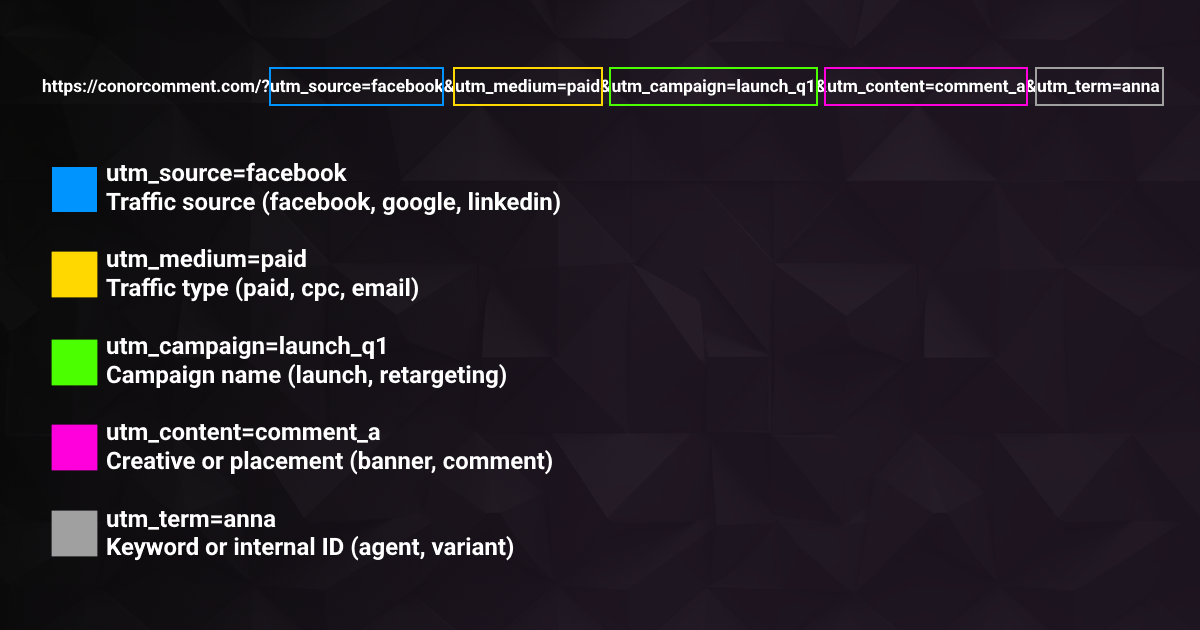
Example URL:
Here is how Google Analytics reads this link.
-
utm_source=facebook
This tells you where the traffic comes from. Typical values include facebook, google, linkedin, or newsletter. -
utm_medium=paid
This defines the traffic channel or type. Common values are paid, cpc, email, or referral. -
utm_campaign=launch_q1
This identifies the campaign or initiative behind the click. Examples include product_launch, bf_2026, or retargeting_us. -
utm_content=comment_a
This differentiates specific creatives, messages, or placements. Examples include banner_v2, video_hook, or comment_link. -
utm_term=anna This is a flexible parameter often used for keywords or internal identifiers. It can represent a keyword, an agent name, or a comment or variation ID.
UTM parameters do not create better performance. They create clarity. Most teams do not have a traffic problem, they have a visibility problem.